Guide
How to measure a PDF to scale on a Mac
Preview, the Mac’s built-in PDF viewer, can’t measure a drawing to scale. The nearest it gets is the size of a selection on the paper, which you then have to convert yourself. To get feet and inches or square feet off a plan for free, open it in a browser tool such as PDF Measure in Safari, set the scale printed on the sheet, and click.
What Preview can and can’t do
Preview has no Measure tool. What it has is the Inspector (Tools › Show Inspector), whose Crop pane shows the size of whatever you select with the Rectangular Selection tool. Apple’s guide to cropping a PDF in Preview describes it: open the Inspector, click the Crop inspector and choose a unit of measurement. The other panes show the file’s details, such as its author and encryption and permissions.
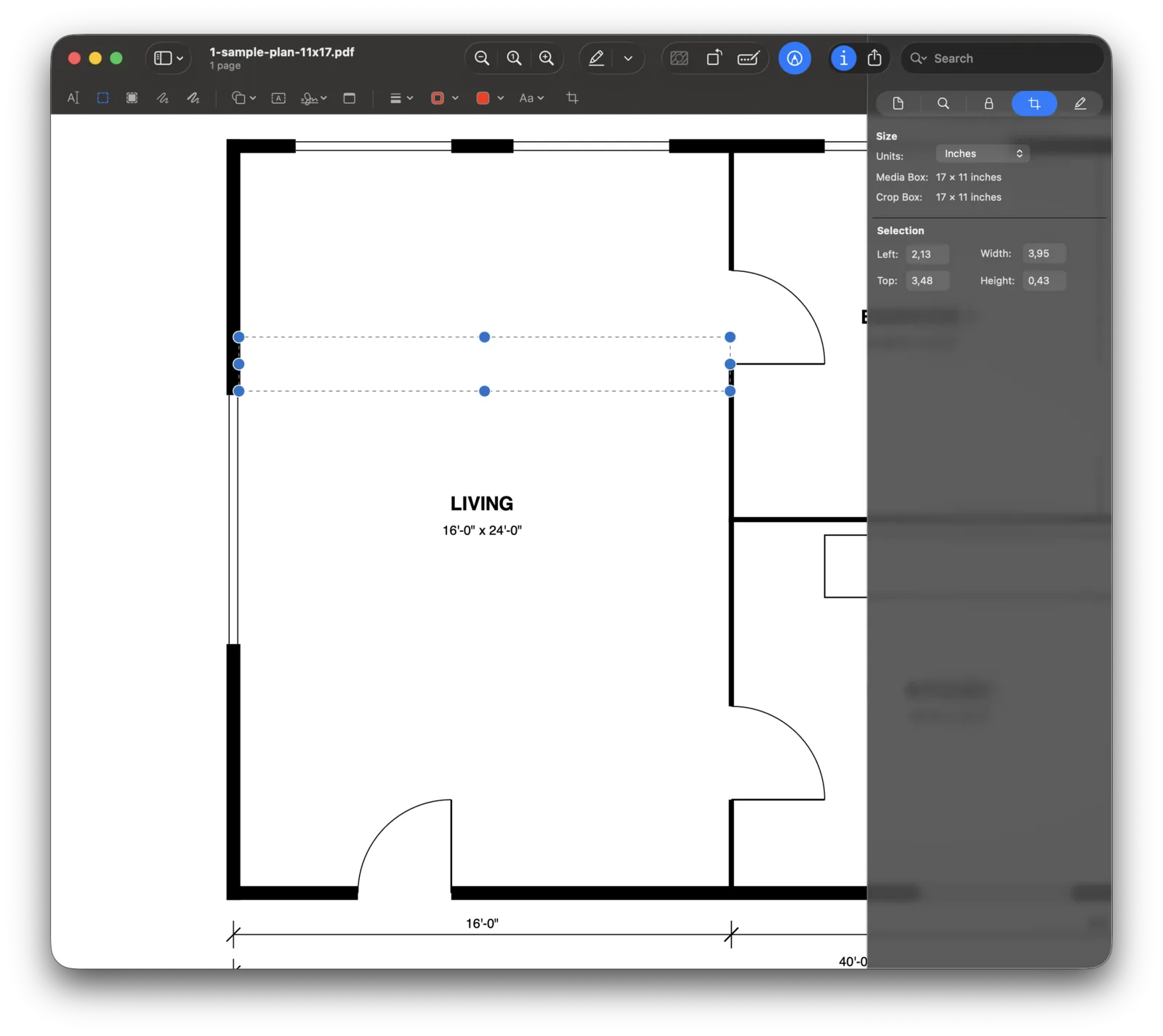
Those are paper sizes, not real lengths. A floor plan is a picture of a building shrunk by its scale. Our sample plan is drawn at 1/4″ = 1′-0″ on an 11 × 17 sheet, so its 16′-0″ living room is 4 inches wide on the page. When we dragged a selection across it in Preview by hand, it read 3.95 in: close, but 0.05 in of paper is already about 2½ inches of room at this scale. Here is what the sheet itself measures, which is what a paper-unit readout can give you at best:
| On the sample plan | Real size | On the 11 × 17 sheet | Same PDF fit to Letter |
|---|---|---|---|
| Living room width | 16′-0″ | 4.00 in | 2.59 in |
| Overall width | 40′-0″ | 10.00 in | 6.47 in |
| Kitchen | 14′-0″ × 12′-0″ (168 ft²) | 3.50 × 3.00 in | 2.26 × 1.94 in |
To turn the middle column into feet you multiply by 4, because a quarter inch is a foot: 4.00 in × 4 = 16′. Areas need the factor squared: 3.50 × 3.00 in = 10.5 in², × 16 = 168 ft². That works on a rectangle, if you get the selection exactly on the wall lines and the file is still at its original sheet size.
The last column is the catch. If someone printed the 11 × 17 sheet to a Letter-size PDF with “scale to fit”, everything shrinks to 65% and the same living room reads 2.59 in. Multiply by 4 and you get about 10′-4″, wrong by more than five feet, and nothing on screen warns you. That is why a measuring tool calibrates against a dimension on the drawing instead of trusting the paper. Our guide on finding the scale of a PDF plan shows how to spot a resized sheet, and the scale calculator converts paper lengths at any scale if you do stay with Preview.
Your options on a Mac, compared
| Cost | Measures to scale | Install | Notes | |
|---|---|---|---|---|
| Preview | Free, built in | No | Nothing | Shows the size of a rectangular selection on the paper. No scale, no areas of odd shapes. |
| Adobe Acrobat Reader | Free | Yes, unless the file is locked | Desktop app | Measured ordinary PDFs in our test, but greys the tool out on files whose security blocks commenting. See why it’s greyed out. |
| Adobe Acrobat Pro | Paid subscription | Yes | Desktop app | Distance, perimeter and area with a scale ratio you set. Worth it if you already pay for Acrobat. |
| PDF Expert (Readdle) | Paid subscription | Yes | Mac app | A Measure tab with Calibrate, Distance, Area and Perimeter; Readdle says the construction tools are part of the paid subscription. |
| Bluebeam | Paid subscription | Partly, in the browser | None for the web version | Revu for Mac reached end of life on June 28, 2023. Bluebeam on the web runs in Safari with length, area, polylength and count, but the scale has to be set in Revu first, and Revu is Windows only. |
| PDF Measure | Free, no account | Yes | Nothing: runs in Safari or Chrome | Distance, area, perimeter, angle and counts, with preset scales or calibration. The file stays on your Mac. |
Checked against each vendor’s own help pages in November 2026. Apple, Preview and Safari are trademarks of Apple Inc.; Adobe and Acrobat of Adobe Inc.; PDF Expert of Readdle; Bluebeam and Revu of Bluebeam, Inc. None is affiliated with PDF Measure. Prices and features change, so check their sites.
Which one? If you measure plans every day and want takeoff with unit costs, a paid tool earns its keep; our comparison with Bluebeam and Acrobat goes into that. If you already pay for Acrobat Pro or PDF Expert, use what you have. For an occasional room size, a quick check of a dimension or a redline, a free browser tool does the job without installing anything.
Step 1: Open the PDF in Safari
Go to pdfmeasure.com in Safari or Chrome and drop the PDF on the page, or click Open a PDF and pick it in the file dialog, where iCloud Drive is in the sidebar. A plan that came by Mail needs saving first: drag the attachment to the desktop or a folder, then drop it on the page. The file is read by Safari on your Mac and never uploaded.
Step 2: Set the scale
Click the scale readout at the bottom right and pick the scale from the title block, here 1/4″ = 1′. If the sheet may have been resized, or has no scale, choose Calibrate and click both ends of a long dimension string, then type its length.
Step 3: Measure
Press M for Distance and click two points, or S for Area and click round the room, double-clicking the last corner. Below, the living room traced inside its outer walls reads 372 sq ft, a little under the 384 ft² of its 16′ × 24′ room size, which is measured to the wall centres. The kitchen measures 12′ 0″ deep.
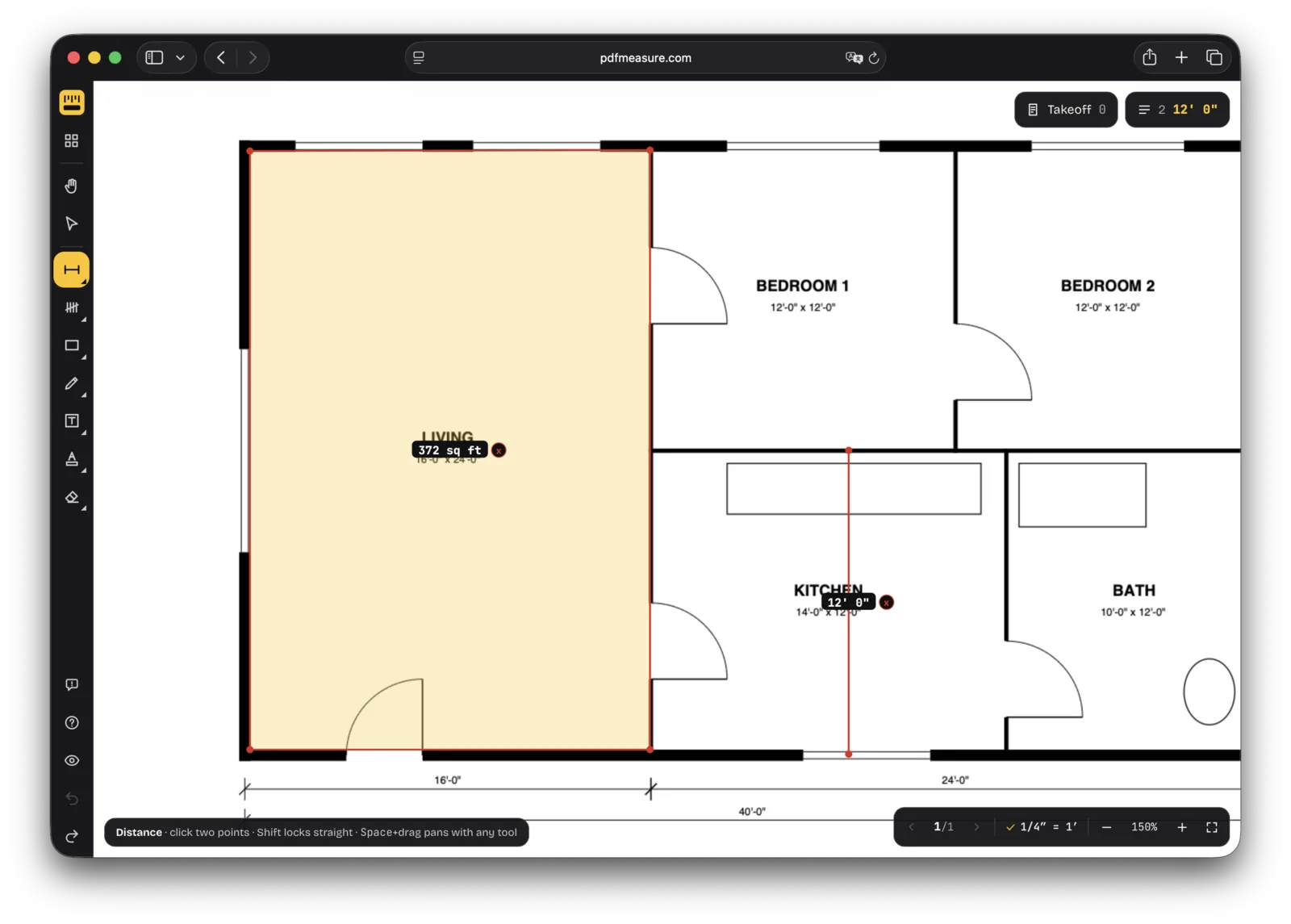
That’s the whole loop. The step-by-step guide to measuring a PDF covers angles, perimeters, the inspector and exporting in more detail.
Tips for measuring on a Mac
- Pinch the trackpad to zoom. It zooms around the pointer, so put the pointer on the corner you’re about to click, then pinch. Two-finger scrolling moves around the sheet. With a mouse, hold Control and scroll.
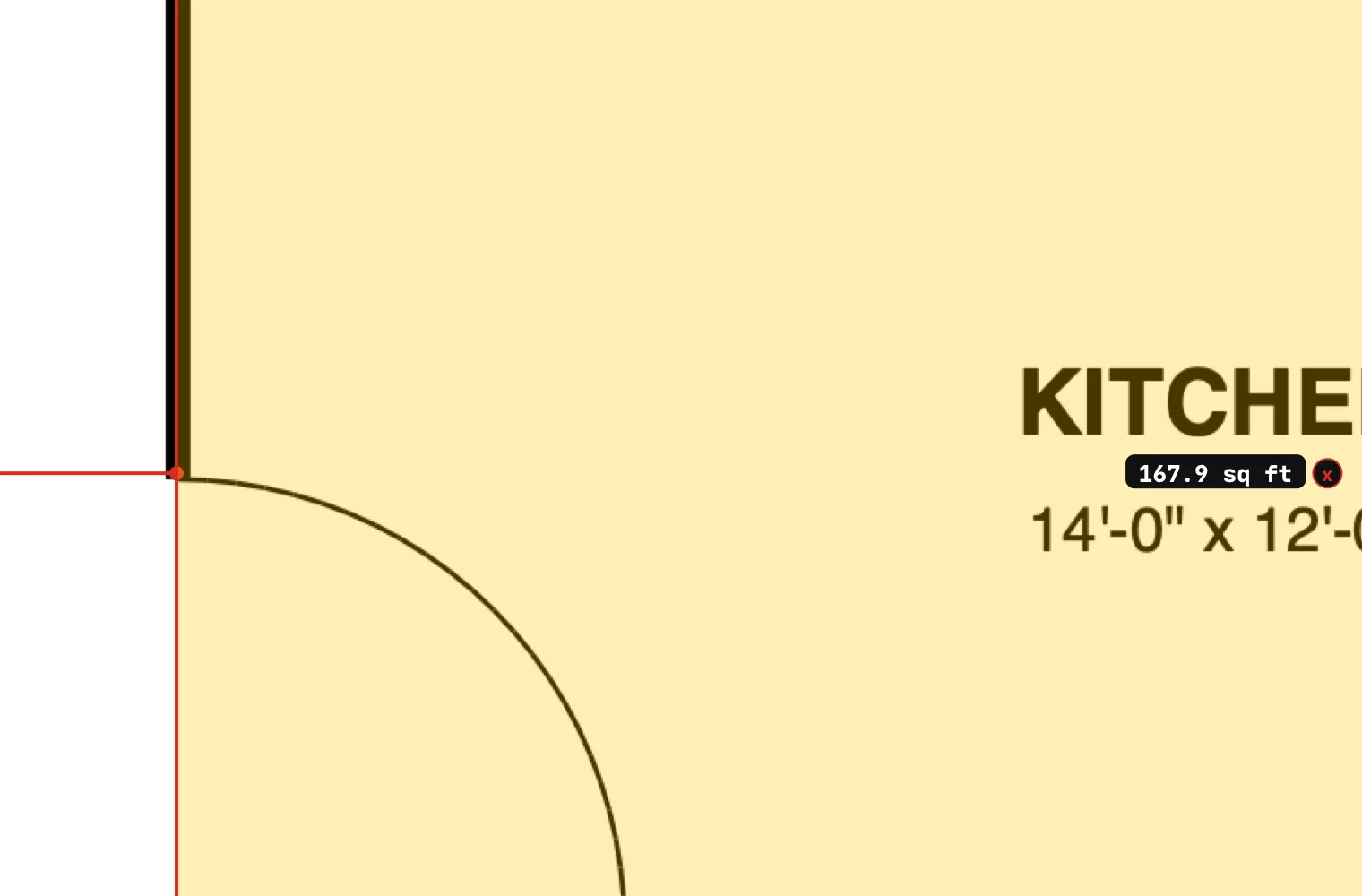
- Zoom in before you click. Points are stored in the PDF’s own coordinates, so the closer you zoom, the more exactly they land. The 0.1 ft² the kitchen lost above is click precision at 100%.
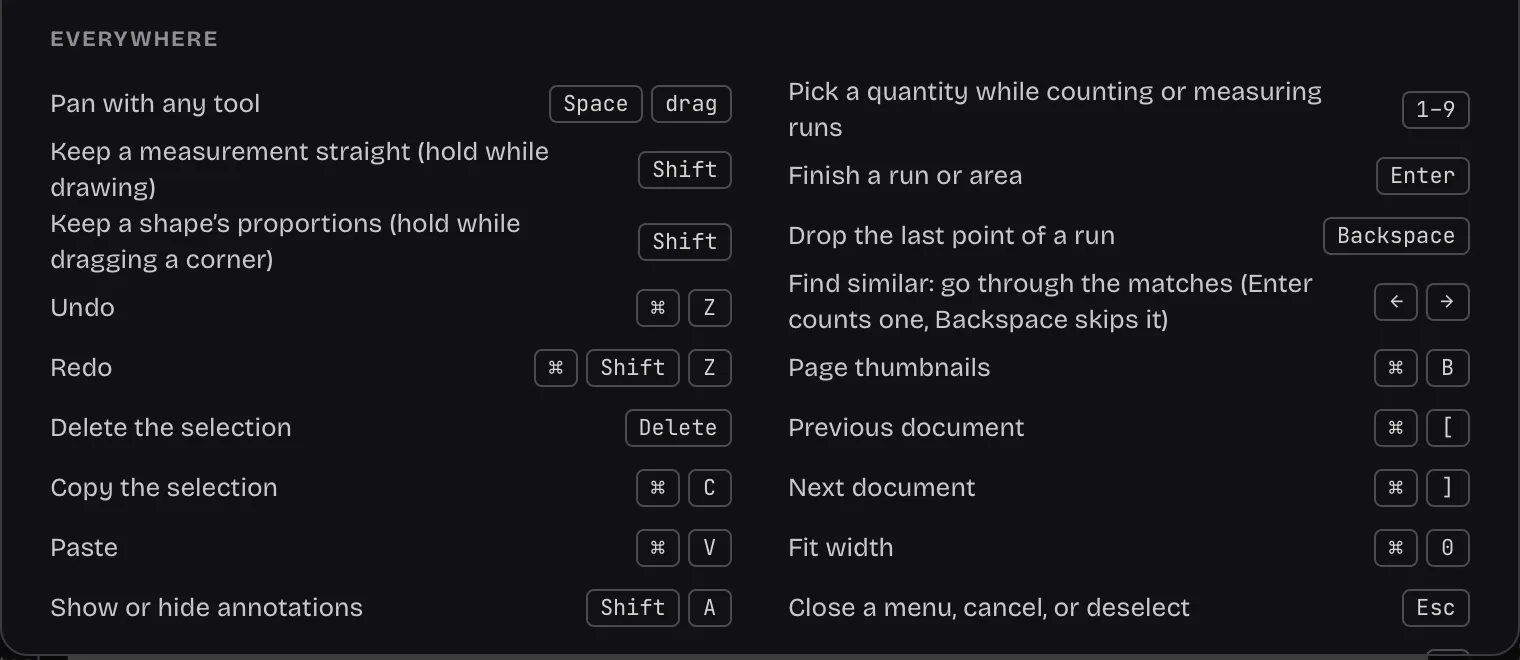
- Use the ⌘ shortcuts you know. ⌘+Z undoes and ⌘+Shift+Z redoes, ⌘+0 fits the sheet to the window, and holding Space while you drag pans with any tool. Hold Shift to keep a line straight. Press ? for the full list, which shows the Mac keys on a Mac.
- Exports go where Safari saves downloads. Export PDF with markup in the File menu saves a copy named after your file with “-annotated” added, in your download folder. You can change that folder in Safari › Settings › General › File download location.
- Your measurements stay in that browser. They come back when you reopen the same PDF in the same browser on the same Mac. To carry them to another Mac, export the markups from the File menu and import them there.
Common mistakes
- Reading Preview’s numbers as feet. A 4.00 in selection is 16′ only at 1/4″ = 1′-0″ and only on the original sheet size.
- Trusting the printed scale on a re-saved file. Printing or exporting to another paper size keeps the “1/4″ = 1′-0″” text but changes the drawing. Measure one dimension string first; if it’s off, calibrate.
- Measuring to the wrong line. Dimension strings usually run to wall centres or stud faces, not to finished surfaces. Decide which you need before you click.
- Clearing the browser’s website data. Measurements are saved in Safari, so clearing its data for the site removes them. Export first if you need to keep them.
Questions people ask
Does Preview on a Mac have a measuring tool?
No. Preview can show the size of a rectangular selection in its Crop inspector, in a unit of measurement you choose, but that is its size on the paper. It has no scale setting, so it can’t give real-world lengths or the area of a room.
Can I measure a PDF with the free Acrobat Reader on a Mac?
Usually. In our test, Acrobat Reader on a Mac measured ordinary PDFs for free, with All tools › Measure objects. It greys the Measuring tool out on files whose security doesn’t allow commenting, and Acrobat Pro needs the file’s password for those too.
Does Bluebeam Revu work on a Mac?
Not natively any more. Bluebeam ended Revu for Mac on June 28, 2023. Bluebeam on the web runs in Safari with length, area and polylength measurements, but the scale has to be set in Revu, a Windows app, first, and it needs a Bluebeam subscription.
Is my PDF uploaded when I measure it in the browser?
Not with PDF Measure. Safari reads the file on your Mac and the measurements are saved in the browser. Nothing is sent to a server, and there is no account.